How to set up x360ce for a gamepad on PC

Emulating any gamepad as an Xbox 360 controller has been possible for about 10 years now. I found an old USB gamepad, the Genius Maxfire Grandias 12, that Windows 11 refuses to recognize. However, the x360ce app lets you set up two controllers and play games like It Takes Two, Revenge of the Savage Planet, or Reanimal.
This article explains how to use and set up x360ce (Xbox 360 Controller Emulator) on Windows 11. The program lets you connect up to four gamepads. You can create separate controller profiles for each game. Even my basic gamepad ended up working as an Xbox 360 controller.
Table of contents:
How to set up x360ce: Xbox 360 controller emulator on PC
By default, Windows 11 detects my gamepad as a Generic USB Joystick. Press Win+R and run joy.cpl to view your connected gamepads. Select which device to use with older programs.
We’ll use x360ce to emulate any gamepad as a classic Xbox 360 controller.
- Download the Xbox 360 Controller Emulator from the official website by clicking DOWNLOAD FOR ALL GAMES. Extract the ZIP archive and run x360ce.exe as administrator.
- Make sure to install the ViGEmBus virtual gamepad driver. Go to Options > Virtual Device and click Install next to ViGEmBus.
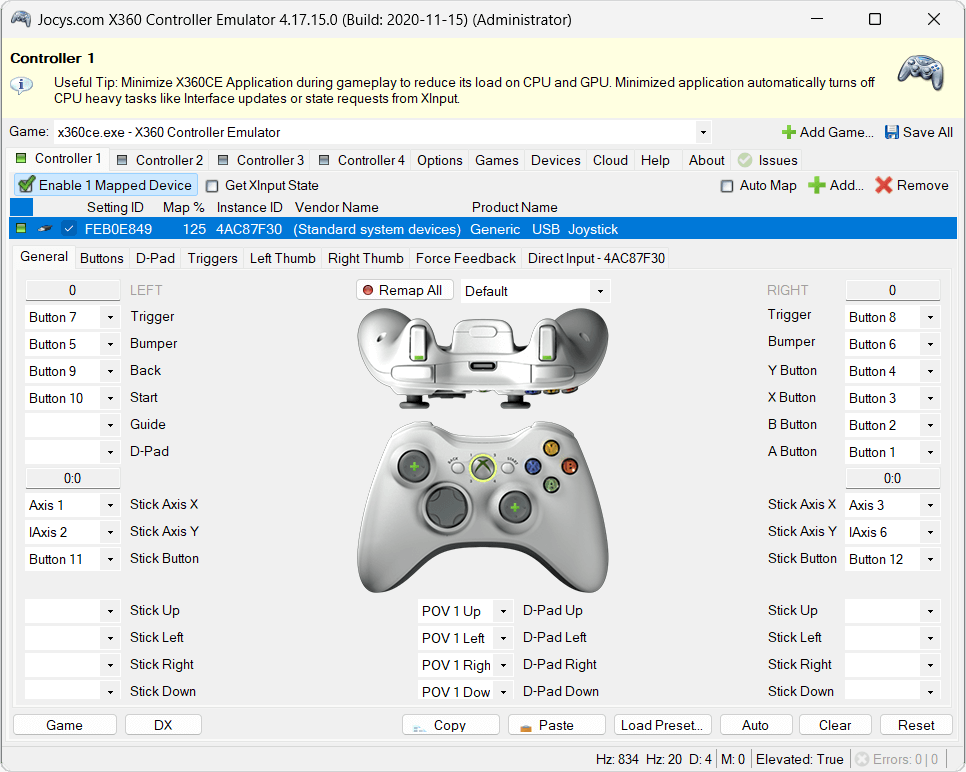
- Connect your controller to your computer. Select Controller 1 and click Add…. Choose the controller you want to add and click OK.
- Enable the controller by clicking Enable # Mapped Device in the Controller 1 tab. Configure your gamepad buttons by clicking Auto, or set each one individually using the [Record] option.
IMPORTANT! The HID Guardian driver allows you to hide original controllers so that only virtual controllers are visible to Windows and games. Install it only if the original controller causes issues with the virtual one. Go to Options > HID Guardian and click the Install button.
| Scenario | HID Guardian required |
|---|---|
| The game sees only one controller and everything works | ❌ No |
| The game sees both physical and virtual controllers (duplicate inputs) | ✅ Yes |
| The game doesn’t recognize the controller without x360ce | 🟡 Possibly |
| The game supports DirectInput natively | ❌ No |
Do not try to remove HID Guardian from Windows 11 Device Manager. This may cause you to lose access to your mouse and keyboard. Uninstall it the same way you installed it.
x360ce not working in Asterix & Obelix XXXL
Much depends on the specific application. As an example, let’s consider the game Asterix and Obelix XXXL – The Ram From Hibernia. I followed all the steps above, but the gamepads still don’t respond. In this case, you’ll need to create your own configuration.
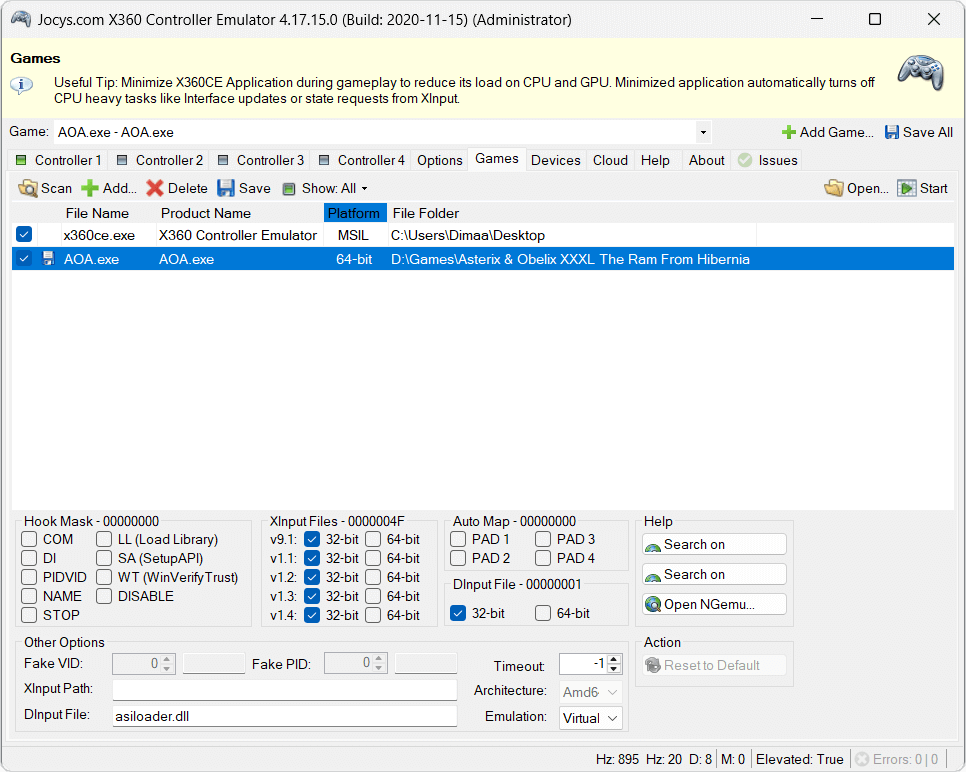
In the Games section, select Add Game… Open the game folder and choose the AOA.exe file. In the XInput Files and DInput File sections, check all 32-bit options. To make the game detect the previously configured gamepads, you must launch it using only the Start button.
How to enable Steam Input (alternative method)
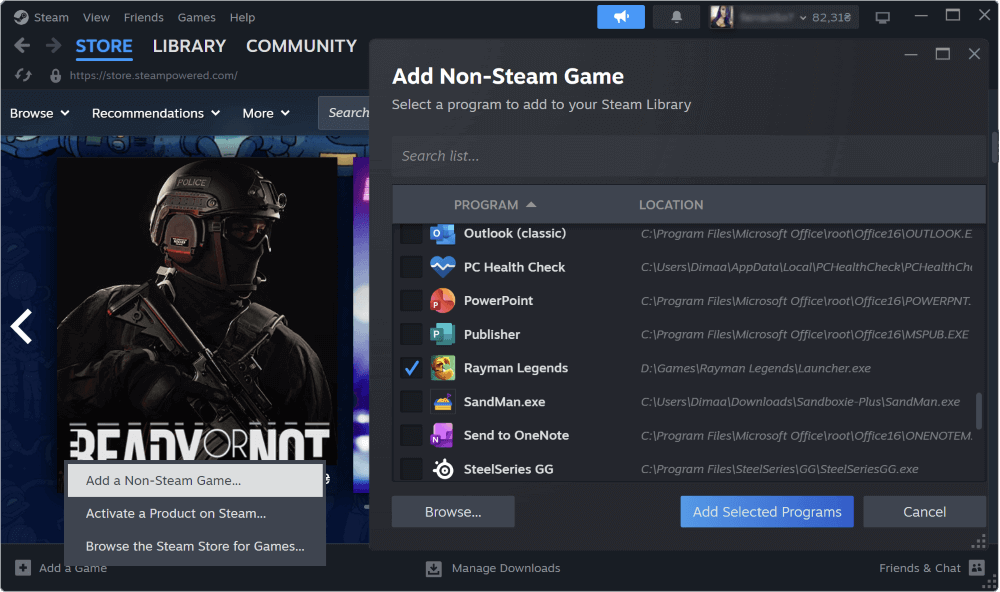
Steam detects my USB gamepad as a Genius Maxfire Grandias 12. Steam Input lets you use any gamepad with games, even without native game support. This means you can add non-Steam games to your library and launch them. Click Add a Game > Add a Non-Steam Game…
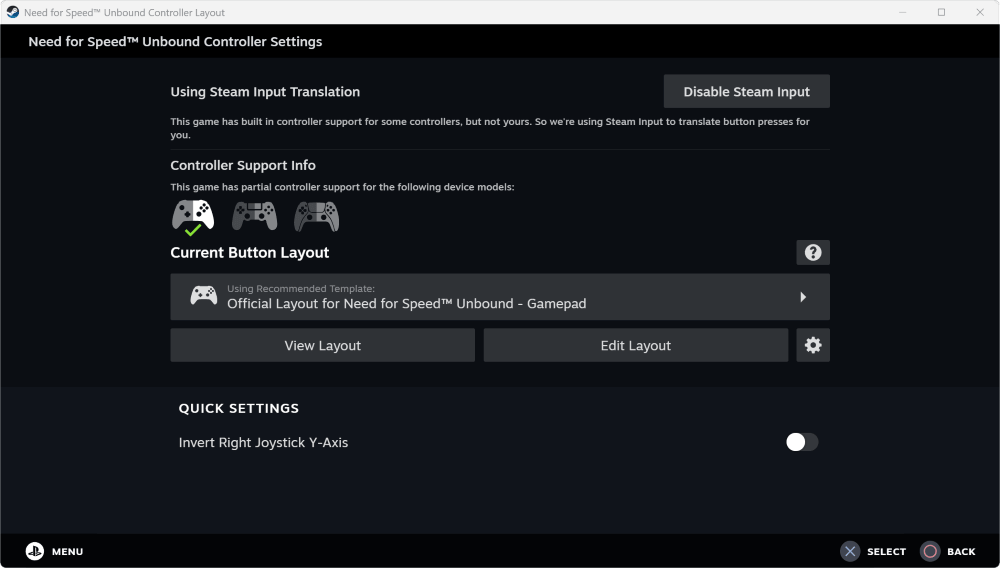
Next, on the game’s page, click Controller Settings and Enable Steam Input. The game Revenge of the Savage Planet then works with my gamepad. The same applies to Need for Speed Unbound and others. If needed, you can configure a control layout or even download a community layout.
Controller not working in Reanimal
It depends a lot on the game as well. For example, my DualSense doesn’t work in the game Reanimal, although the description says it supports USB. I tried everything and came to the conclusion that x360ce is the best option. It lets me use a Genius Maxfire Grandias 12 and a DualSense at the same time.
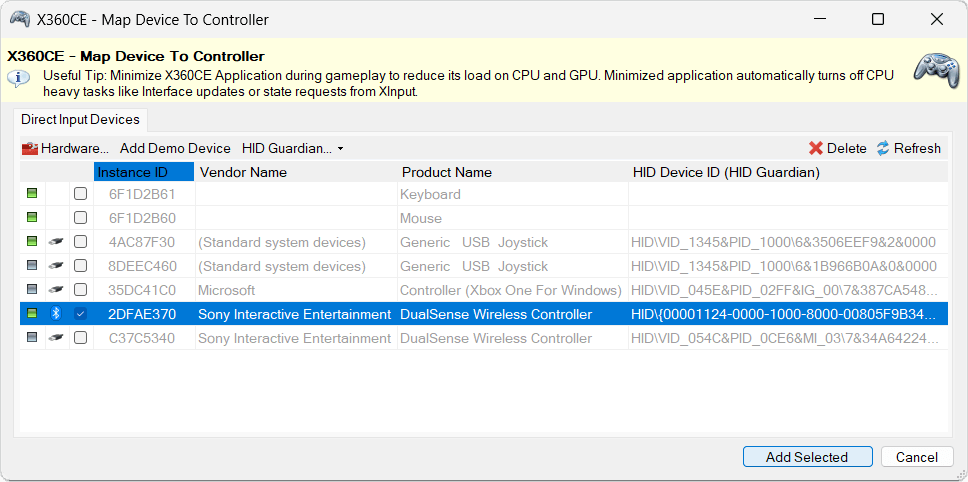
My old controller is already connected, with the buttons mapped manually. For the DualSense, I simply click Controller 3, then Add…, then select DualSense Wireless Controller and use Auto to map the buttons. I launch the game Reanimal and everything works. But of course, both Steam and the game see the gamepad as an Xbox 360 controller.
If the program detects any issues, it will notify you. A “1 Issue” message will appear in the menu, showing what’s missing for it to work properly. For example, you may need to install Microsoft Visual C++ 2015–2019 Redistributable or ViGEmBus.
Conclusions
In simple terms, the x360ce application lets you connect any gamepad to a computer and configure it. By default, Windows 11 detects my old USB gamepad but doesn’t respond to it at all. Emulating it as an Xbox 360 controller is what fixes this problem.
In some games, Steam can replace x360ce. You can add non-Steam apps to Steam. You can even add the Epic Launcher and launch games through it. However, Reanimal doesn’t work with Steam Input. You could say that the Xbox 360 Controller Emulator is a universal emulator.